How clean are DINPROXY residential IPs? Results from 5 IP checkers
One IP on five widely used IP checkers: fraud scores, risk, IP type, location and speed, side by side.
By DINPROXY Team · · 6 min read
On this page
Before a website lets a request through, it often checks the IP address behind it. A datacenter IP, an address on a blocklist, or one that thousands of people share can bring CAPTCHAs, blocks and flagged accounts, however careful the rest of your setup is. So the first question to ask of any residential proxy is simple: how clean are its IPs?
We ran DINPROXY residential proxies through five of the most widely used IP checkers: IPQualityScore, Scamalytics, ping0, IPinfo and Whoer. They are run by different companies and look at an IP in different ways. Two of them score fraud risk with their own models, one rates IP purity and how many people share an address, one reads network registration records, and one shows what a website sees. When all five reach the same verdict on the same IP, the result is hard to argue with.
How we tested
In November 2026 we asked DINPROXY for a residential IP in the state of Ceará, Brazil, by adding @country=br@state=ceara to the proxy username. We held the IP in a sticky session and checked it on all five sites one after another, so every result below belongs to the same IP and the five checkers can be compared directly. We recorded every dimension each site reports, and the screenshots below are taken from the checkers' own pages, with the IP address hidden. Other IPs we checked scored just as low.
Five checkers, one verdict
Each checker looks at the IP from a different angle. This is what each one reported, side by side. A dash means that checker does not report the item:
| Check | IPQualityScore | Scamalytics | ping0 | IPinfo | Whoer |
|---|---|---|---|---|---|
| Risk score | 5 / 100 | 0 / 100 | 3% | No risk flags | No risk flags |
| Verdict | Low risk | Low Risk | Extremely Clean | Clean | Clean |
| VPN | No | No | No | No | No |
| Tor | No | No | No | No | No |
| Datacenter or hosting | No | No | No | No | No |
| Blacklists | Not listed | None of 5 | — | — | Not listed |
| Recent abuse or bots | No | No | — | — | — |
| IP type | Local ISP | Residential | Residential | Residential | Home broadband |
| Native IP | Yes | Yes | Yes | Yes | Yes |
| People on the IP | — | — | 1–10 (Excellent) | ~1 device | — |
| Location | Ceará, Brazil | Ceará, Brazil | Ceará, Brazil | Ceará, Brazil | Ceará, Brazil |
Three separate risk ratings put the same IP at the bottom of their scales, and none of the five checkers found a VPN, Tor or datacenter connection. ping0 and IPinfo both found almost nobody else on the address. And all five agree on what it is and where it is: a native home connection in Ceará, Brazil.
Scamalytics and IPinfo also recognise the address as part of a residential proxy network, and Scamalytics names DINPROXY as its provider. That is exactly what it is: a real home connection offered through DINPROXY residential proxies, which is what you are buying. Everything that separates a clean residential IP from a risky one came back clean.
Five checkers, one location
Each checker uses its own location database, and websites rely on these databases to decide where a visitor is. All five placed the IP exactly where we asked for it:
| Checker | Country | State |
|---|---|---|
| IPQualityScore | Brazil | Ceará |
| Scamalytics | Brazil | Ceará |
| ping0 | Brazil | Ceará |
| IPinfo | Brazil | Ceará |
| Whoer | Brazil | Ceará |
IPQualityScore goes one step further and names the town, Monsenhor Tabosa, with the local time zone, America/Fortaleza. Five separate databases agreeing on the place means DINPROXY location targeting is accurate: the location you choose in the username is the location websites see. That matters for local search results, regional prices, ad checks and any account that should log in from one consistent place.
What each checker reported
IPQualityScore: fraud scoring
IPQualityScore rates how likely an IP is to be involved in fraud, using its own history of proxies, bots and abuse. Many sites use scores like this to decide whether to trust a visitor.
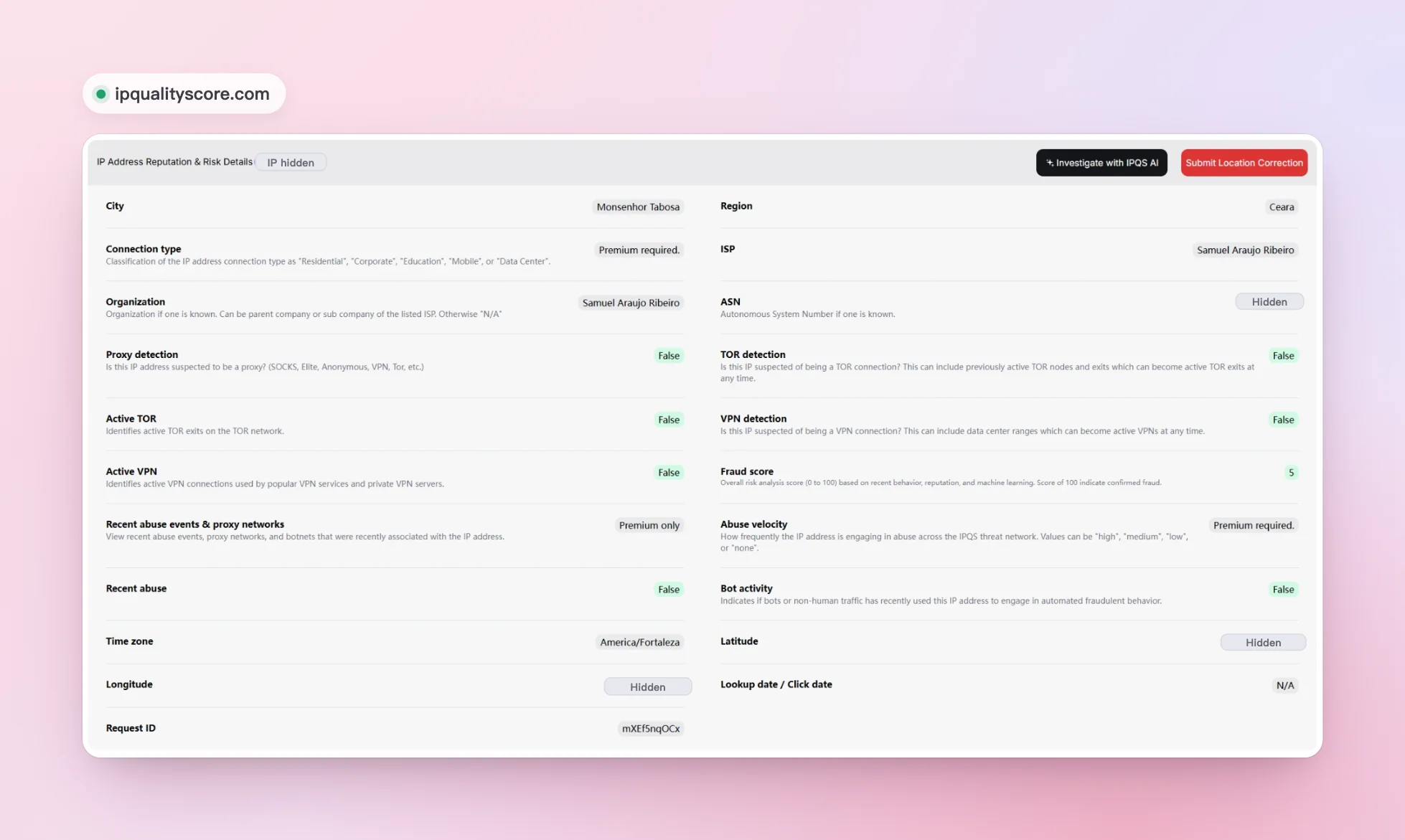
| Dimension | DINPROXY result |
|---|---|
| Fraud score | 5 of 100 |
| Proxy detection | False |
| VPN detection | False |
| Tor detection | False |
| Recent abuse | False |
| Bot activity | False |
| Location | Monsenhor Tabosa, Ceará, Brazil |
| Time zone | America/Fortaleza |
A fraud score of 5 sits at the bottom of a 0 to 100 scale, and every abuse and anonymity check came back false.
Scamalytics: a second fraud model
Scamalytics scores IPs with a separate model, so it is a useful second opinion on IPQualityScore. It also checks the address against five open blocklists.
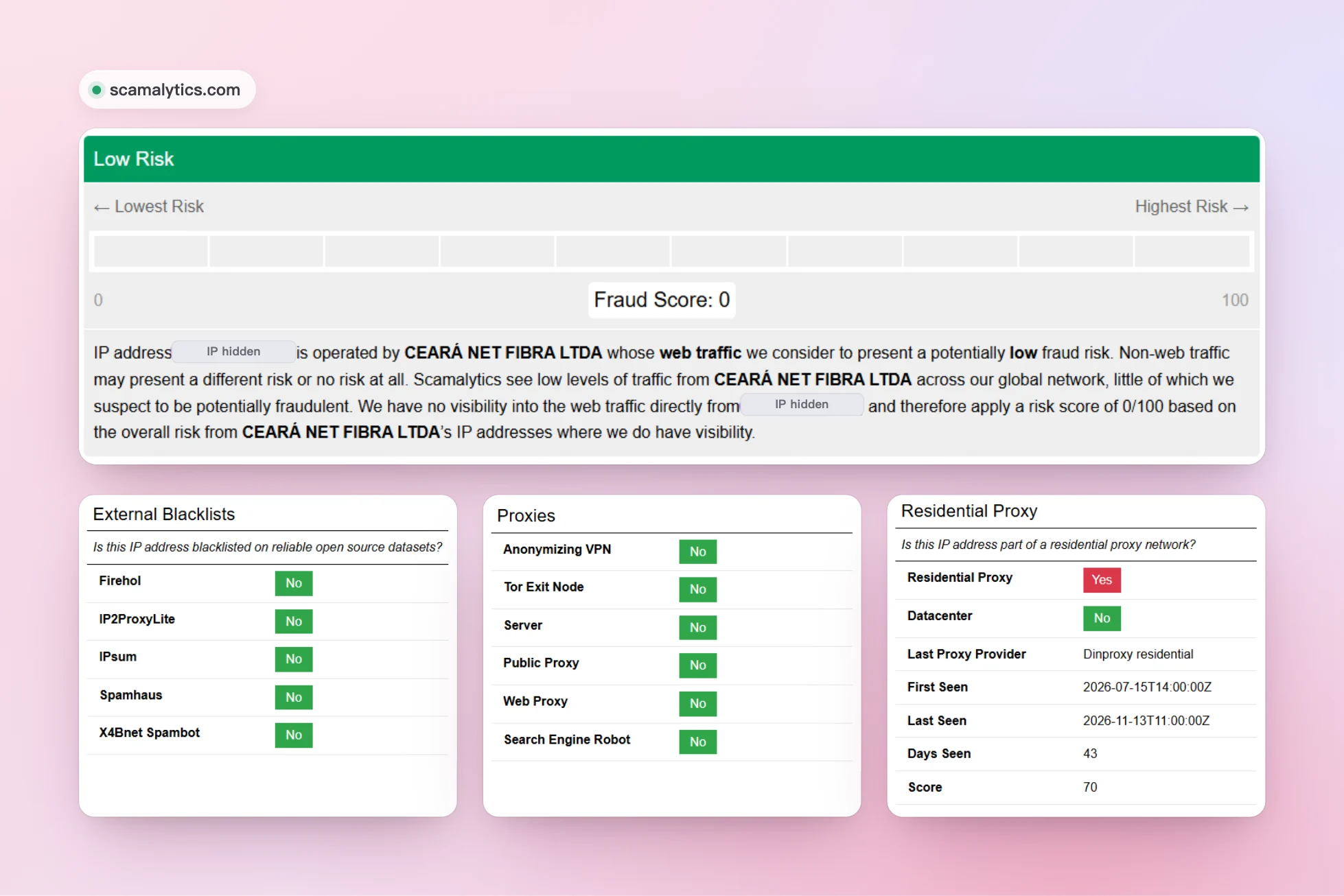
| Dimension | DINPROXY result |
|---|---|
| Fraud score | 0 of 100 |
| Risk verdict | Low Risk |
| Blacklists (Firehol, IP2ProxyLite, IPsum, Spamhaus, X4Bnet Spambot) | Not listed on any |
| Anonymizing VPN | No |
| Tor exit node | No |
| Server | No |
| Public proxy or web proxy | No |
| Datacenter | No |
| Residential proxy network | Yes, DINPROXY residential |
Two separate models gave the same IP the lowest scores on their scales: 5 and 0 out of 100.
ping0: purity and sharing
ping0 rates how clean an IP is and adds the labels that matter most for multi-account and e-commerce work.
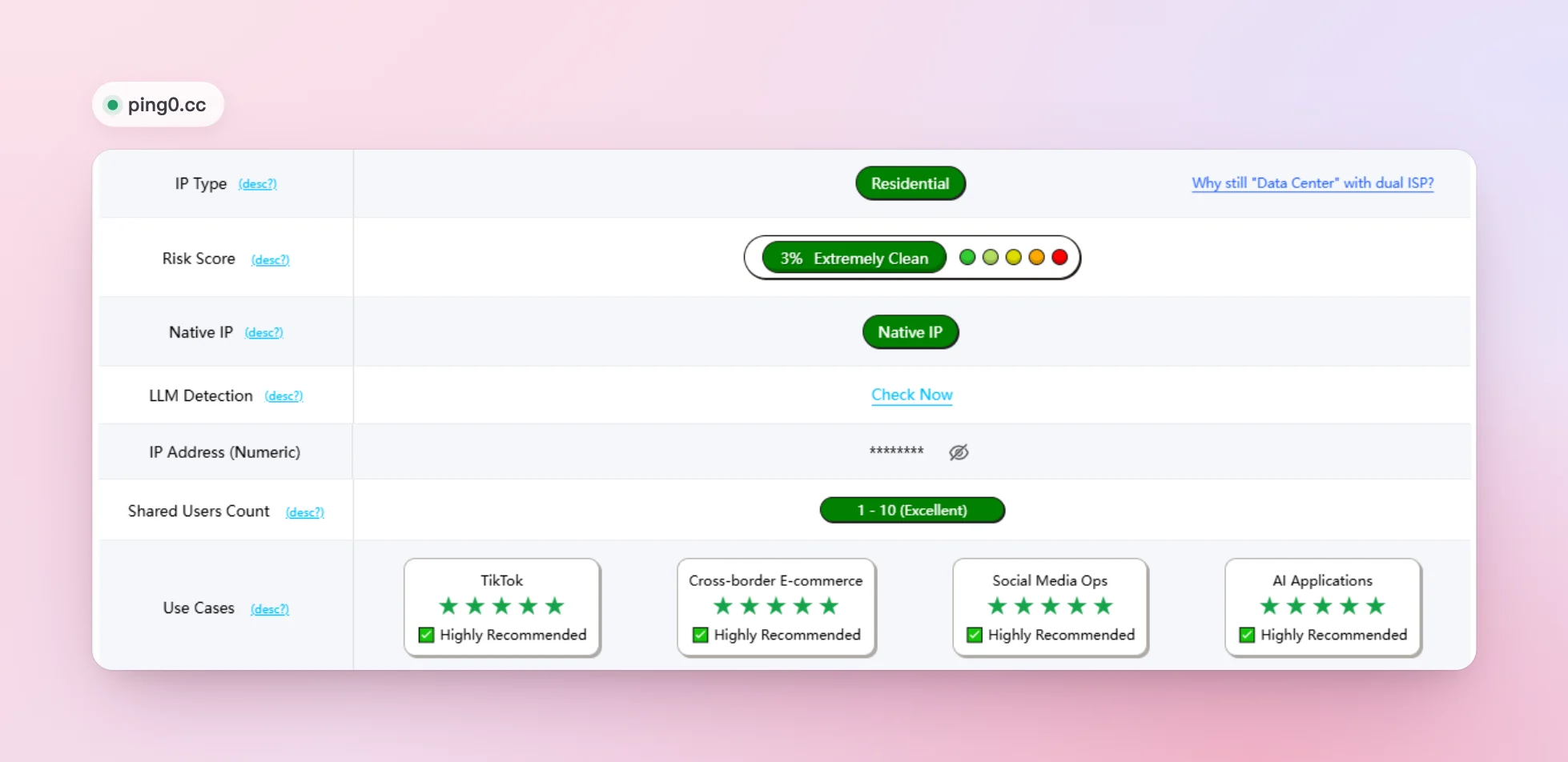
| Dimension | DINPROXY result |
|---|---|
| IP type | Residential |
| Risk score | 3%, Extremely Clean |
| Native IP | Yes |
| Shared users count | 1–10 (Excellent) |
| TikTok | ★★★★★ Highly recommended |
| Cross-border e-commerce | ★★★★★ Highly recommended |
| Social media ops | ★★★★★ Highly recommended |
| AI applications | ★★★★★ Highly recommended |
A native IP means the address's registration and location agree, and 1 to 10 users is ping0's best sharing rating, close to a private connection.
IPinfo: anonymization checks
IPinfo reads who owns an address and checks it against its own privacy detection. Sites use it to separate VPNs, relays and hosting ranges from ordinary users.
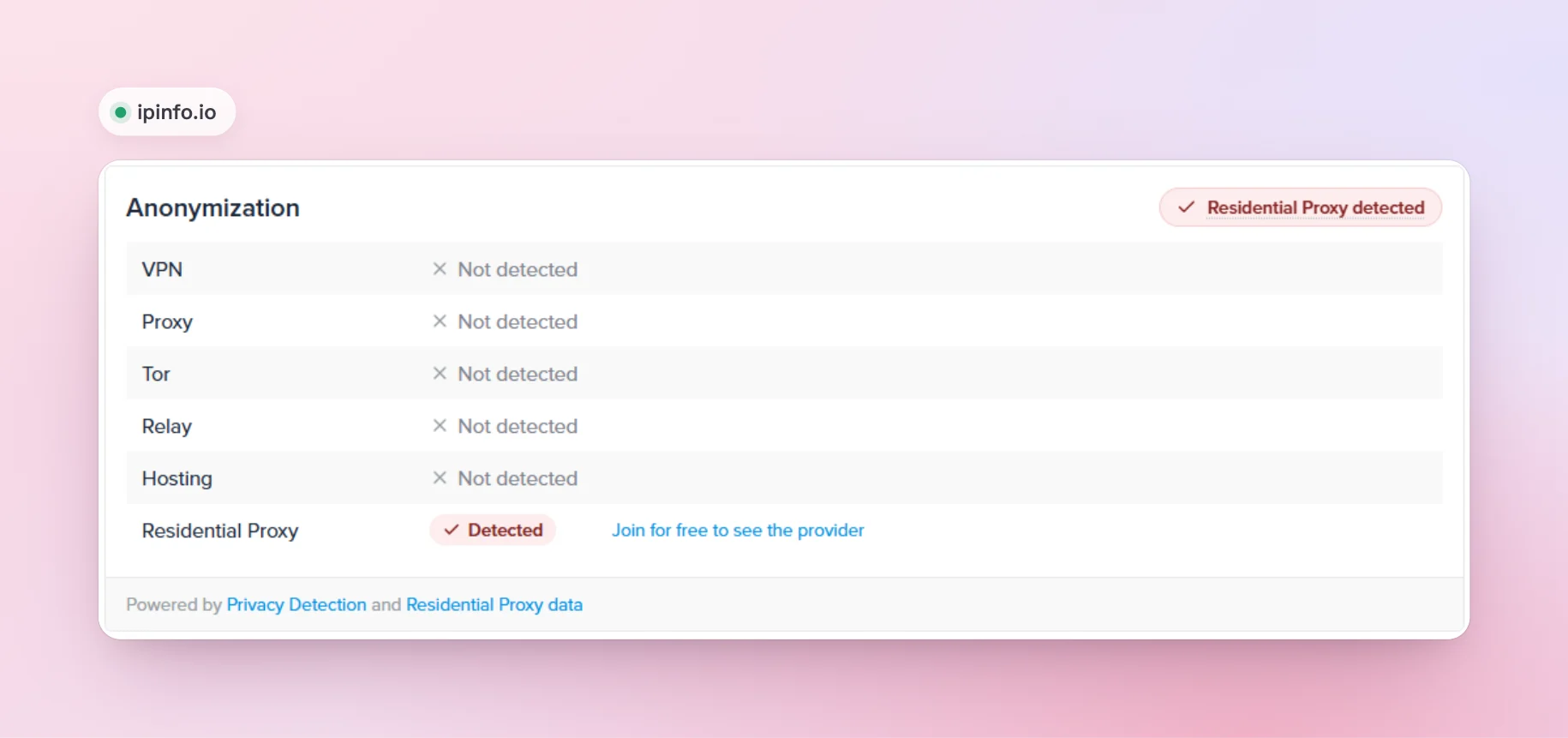
| Dimension | DINPROXY result |
|---|---|
| VPN | Not detected |
| Proxy | Not detected |
| Tor | Not detected |
| Relay | Not detected |
| Hosting | Not detected |
| Residential proxy | Detected |
| Devices on the IP | About 1 |
| Location | Ceará, Brazil |
IPinfo's device count, about one, matches ping0's 1 to 10 users: two different methods, the same answer.
Whoer: what a website sees
Whoer shows the details a website receives when you visit it.
| Dimension | DINPROXY result |
|---|---|
| Provider | Home internet provider |
| Connection | Home broadband, not a datacenter |
| Proxy or VPN | Not detected |
| Blacklists | Not listed |
| Location | Ceará, Brazil |
Speed test
| Dimension | Result |
|---|---|
| Latency | 60 ms |
| Download | 21.7 Mbps |
| Jitter | ±25 ms |
| Requests successful | 5 of 5 |
| Protocol | HTTP |
A clean IP is only useful if it is fast enough for real work. Your own latency depends on where you run your code, the country of the IP and the site you visit, so test with your real targets.
Why the IPs score clean
- Real home connections. DINPROXY residential IPs come from real devices whose owners chose to take part, which is why checkers see consumer internet providers rather than hosting ranges.
- A large pool. More than 120 million residential IPs in over 195 countries, so traffic is spread across many addresses.
- Location you choose. Pick the country, state or city in the proxy username, and the IP comes from that place. In this test all five checkers placed the IP in the state we asked for.
- Rotation or sticky sessions. Rotate to a new IP on every request, or hold one IP for up to 120 minutes when a login or checkout needs a steady identity. The guide to rotating vs sticky sessions explains both.
Check the IPs yourself
The quickest test uses a browser or an anti-detect browser:
- Create a proxy user in the dashboard under Tools → Users and copy its connection username, such as
1024~myuser. - Set the proxy to
proxy.dinproxy.com, port7777, with your password and this username:USERNAME@country=br@state=ceara@session=check1@time=30. The session keeps the same IP in Ceará, Brazil, for 30 minutes, so all five checkers see the same address. - Open IPQualityScore, Scamalytics, ping0, IPinfo and Whoer, and compare the scores and the locations.
- For another IP, change the session ID, for example to
check2.
You can also check an IP from code. This request goes through the same sticky session and prints the IP, its network and its location as IPinfo sees them:
import { fetch, ProxyAgent } from "undici";
const username = "USERNAME@country=br@state=ceara@session=check1@time=30";const token = Buffer.from(`${username}:PASSWORD`).toString("base64");const dispatcher = new ProxyAgent({ uri: "http://proxy.dinproxy.com:7777", token: `Basic ${token}` });
const response = await fetch("https://ipinfo.io/json", { dispatcher });console.log(await response.json());Replace USERNAME with your connection username and PASSWORD with the proxy user's password. To see how DINPROXY compares with other providers on price and billing, read the 10 best residential proxy providers in 2026.
Sources
The checkers used in this test:
Frequently asked questions
In our November 2026 test the IP scored 5 out of 100 on IPQualityScore and 0 out of 100 on Scamalytics (Low Risk), and ping0 gave it a 3% risk score, rated Extremely Clean.
Yes. We asked for an IP in Ceará, Brazil, and all five checkers placed it there. Choose the country, state and city with @country=, @state= and @city= in the proxy username.
Some do, and correctly: Scamalytics and IPinfo recognise the IP as part of a residential proxy network, because it is one. None of them flagged a VPN, Tor, datacenter or blacklist entry, and ping0 rated it a residential native IP.
In our speed test the IP had 60 ms latency and 21.7 Mbps download, and all 5 requests succeeded. Your own latency depends on where you run your code, the country of the IP and the site you visit.